
Free forever · v1.5.0
Skagway
A Mac video organizer for the files already on your drives.
Built to stay fast with thousands of videos. Browse, tag, filter, and play large collections — without locking media into a proprietary container.
Verify download (SHA-256)
- Filename: Skagway.dmg (v1.5.0, build 1325)
- In Terminal:
shasum -a 256 ~/Downloads/Skagway.dmg - Expected: 1df894601bf0214d95e1abe7796a35555221e8b7df8917e65761608ca820b943
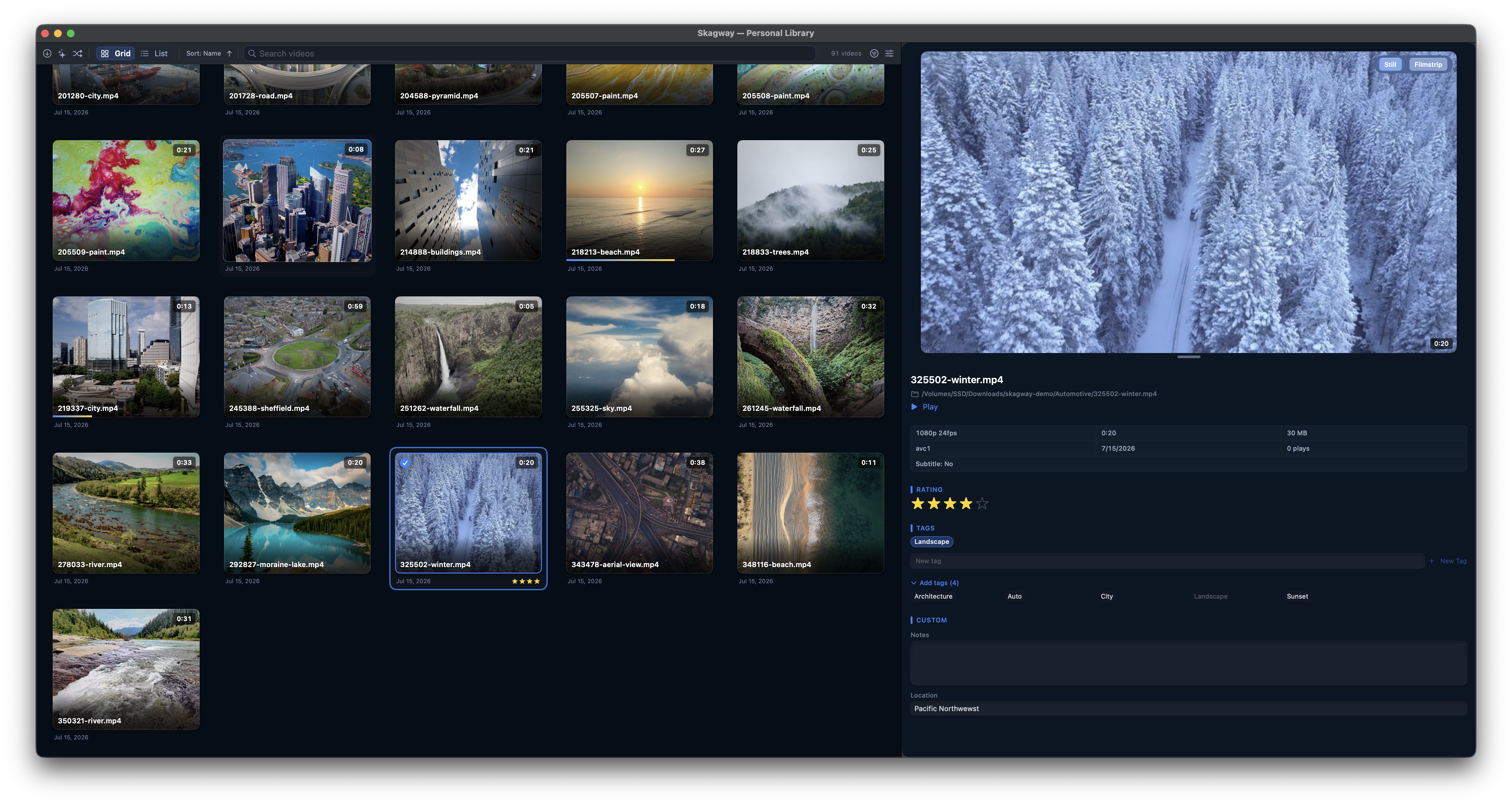
What Skagway does
See every clip on every drive
Point Skagway at the folders you already keep, on this Mac or another drive. It catalogs and thumbnails them. The files stay where they are.
Find any moment by eye
Rest on a thumbnail and a silent preview plays through the clip. Storyboard shows six frames of each video, so similar files stop looking the same.
Free forever, private by default
No account, no ads, no subscription. No telemetry. Optional update checks stay off until you turn them on. None of your data leaves your Mac.
Stays fast with thousands of videos
Long, short, tiny, and enormous files. The library stays smooth.
New in 1.5.0
Make a playable copy
Convert natively unplayable files into playable copies. Many video formats are supported.
- Your original file stays in the catalog. The converted MP4 copy is played.
- The Corrupt smart library is renamed Unplayable.
Bulk Rename
Usability enhancements, templates, and undo.
Previous releases
1.4.1
- Bug: The extra “+N” in the middle of a tag row is gone. The count for tags that do not fit stays at the end of the row.
1.4.0
- Feature: Rate and tag from the card. Stars, keys 1–5, and tags, without opening the Inspector. Option-click filters. A selected clip changes every selected video.
- Feature: Rename or delete a tag from the Inspector.
1.3.1
- Feature: Delete Video is ⌘⌫, with a keyboard-friendly confirmation that names the files.
- Feature: In Duplicates, a video that’s no longer a duplicate stays in view, marked Resolved.
1.3.0
- Feature: Storyboard view — six frames per video (⌘3). Click a frame to play from there.
- Feature: Hide and show the Inspector (⌘I).
- Feature: A label beside the scrollbar as you scroll.
- Feature: Reconnect when a folder moves. Preview, apply, undo.
- Feature: Filmstrip in the player — frames above the scrubber.
1.2.0
- Feature: Always-on collection — collect with ⌘-click, ⇧-click, and A while you browse; focus and collection stay separate.
- Feature: Batch and single inspect — orange Inspector for the collected set; light blue for one clip.
- Feature: Collected-set pill — count with ✕ to clear; ⇧⌘A clears the set.
1.1.1
- Bug: Browser keyboard after text input — selecting a clip defocuses search and Inspector text fields so Space plays and arrow keys navigate again.
- Bug: Review mode tag targets — tag add/remove snapshots the active target so focus changes cannot retarget onto the collected set.
- Feature: Membership filter — Advanced Filter and Smart Collections support is member of / is not member of for smart libraries and albums.
- Feature: Unified Filter drawer — Quick and Advanced are tabs in one drawer (⌘⇧F); collection rule synopsis in the header pill.
- Polish: Sparkle publish checklist and DMG/appcast verify script to prevent stale CDN downloads.
1.1.0
- Feature: Collect while browsing — ⌘/⇧ multi-select with separate focus and collected set.
- Feature: List hover preview — silent scrub on List thumbnails, like Grid.
- Feature: Review mode in Grid and List with collect circles and Inspector batch editing.
1.0.0
- Feature: First public release — organize local video libraries in Grid or List without moving files into a proprietary container.
- Feature: Search, Quick Filter, smart collections, albums, tags, ratings, and custom metadata.
- Feature: Inline and floating playback, Play All, bookmarks, bulk rename, and metadata export/import.
- Feature: Free forever; no telemetry by default.
Your folders. Your files.
Point Skagway at the folders you already keep. It builds a fast catalog and thumbnails — nothing moves into a proprietary container. Convert natively unplayable files into playable copies. Many video formats are supported.

See inside. Play without leaving.
Live preview, filmstrip, and a floating player that stays out of the way. Resume, Play All, bookmarks — the library stays on screen.

Filters, tags, collections, and file tools live in the manual.
Keyboard-driven
Arrows, Space, Play All, and one consistent modifier scheme — triage without reaching for the mouse.
FAQ
Why isn’t Skagway on the Mac App Store?
Is Skagway really free?
Does Skagway send my library or viewing data anywhere?
Does Skagway move or copy my video files?
Free forever. Really.
The full app — every feature above, as well as all future versions. No trial, no paywall, no ads, no subscriptions. No tracking. It runs on your Mac — there's nothing we can unplug. Serious software, yours forever.